Five-Minute Eino ADK Quickstart
This article is for developers already familiar with Eino, focusing on the most important autonomous decision-making primitive in ADK: ChatModelAgent and its runtime enhancement mechanism ChatModelAgentMiddleware.
Getting to Know ChatModelAgent
When we talk about “Agent,” most of the time we mean: an entity with a large model at its core, equipped with tools, capable of autonomous decision-making and solving complex real-world problems. ChatModelAgent is Eino ADK’s direct implementation of this concept.
ChatModelAgent = A ReAct Agent that uses ChatModel as the decision maker, Tools as the action space, and tool feedback plus history as context for the next decision cycle.
Four key components:
- ChatModel: The large model, responsible for reasoning and decision-making.
- Tools: A collection of tools that define the range of actions the Agent can perform.
- Feedback: Tool execution results are fed back into the model context, serving as the basis for the next decision cycle.
- History: Complete preservation of reasoning traces, tool calls, and tool results throughout the problem-solving process.
Therefore, ChatModelAgent is not a single model call, but a continuous problem-solving process.
ChatModelAgent Execution Structure: ReAct Loop
The core capability of ChatModelAgent is autonomous decision-making — within a single Run, the model can repeatedly reason, act, and receive feedback until the problem is solved. The execution structure that supports this capability is the ReAct Loop.
Autonomous decision-making requires four elements to be present simultaneously:
- Decision Maker (ChatModel): In each iteration, it determines what to do next based on the current context.
- Action Space (Tools): Defines the concrete actions the Agent can take.
- Feedback Signal (Tool Feedback): Action results are injected into the context, becoming the basis for subsequent decisions — this enables the Agent to correct course based on actual execution results rather than making a single guess.
- Accumulated Context (History): Complete preservation of reasoning traces, tool calls, and tool results. In each iteration, the model sees not an isolated single query, but the complete problem-solving process from start to the current point.
These four are indispensable: without a decision maker, there’s no reasoning; without an action space, there’s no execution; without feedback, there’s no correction; without accumulated context, there’s no way to make better decisions based on history.
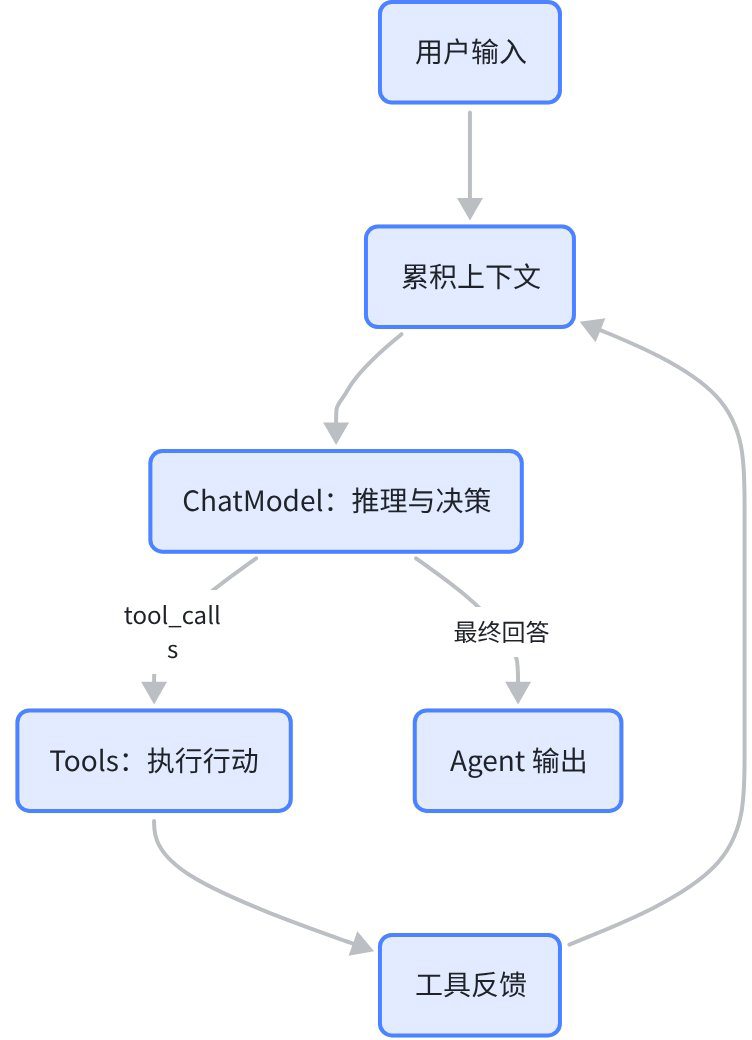
Key characteristic: Progressive decision-making driven by accumulated context. Each loop iteration doesn’t start from zero, but continues building on the complete trace of all previous reasoning and actions. Every model decision is made based on an ever-growing problem-solving context, enabling the Agent to handle complex tasks requiring multi-step reasoning, trial-and-error, and correction.
What Makes Your ChatModelAgent Different
The structure of the ReAct Loop is fixed. So what makes your ChatModelAgent different from others, able to address your specific problem?
Four dimensions:
- ChatModel — Which model makes the decisions.
- Instruction — System instructions: role definition, behavioral constraints, few-shot examples.
- Tools — Tool collection: determines what the Agent can do.
- Middleware (ChatModelAgentMiddleware) — Injects behavior at specific lifecycle hook points of the ReAct Loop: intercept, modify, and enhance inputs and outputs within the loop.
The first three define what the Agent “is” — decision capability, role constraints, action range.
Middleware defines “how it runs” — it doesn’t change the Loop’s structure (reason → act → feedback remains constant), but controls the specific runtime behavior of the loop. For example: compressing context before model calls, dynamically injecting tools before running, performing permission checks during tool calls, retrying or switching to backup models on model failure. These are all runtime enhancements at specific hook points of the Loop.
Middleware: Injecting Behavior into the ReAct Loop
When building a ChatModelAgent, you’ll encounter these typical problems:
- Agent needs to read/write files, execute commands? → Need to inject a set of common tools before running.
- Agent needs to reuse predefined instructions and knowledge? → Need to package reusable capabilities as Skills, loaded on demand.
- Context growing too long, exceeding the model window? → Need to automatically compress history before each model call.
- Too many tools, stuffing them all into the prompt dilutes attention? → Need to search and load tools on demand.
- Model occasionally fails or returns garbage? → Need automatic retry or backup model switching.
What these requirements have in common: they don’t need to change the ReAct Loop’s structure, they just need to intercept and enhance at specific hook points of the loop. This is what Middleware does.
Corresponding built-in Middleware:
| Scenario | Middleware | What It Does |
| Need filesystem capabilities | FileSystem | Injects tools like ls/read/write/edit/grep/execute before running |
| Reuse predefined capabilities | Skill | Packages instructions, knowledge, and tools as skill units that can be loaded on demand |
| Context exceeds window | Reduction / Summarization | Compresses messages and tool results before model calls |
| Too many tools | ToolSearch | Searches and loads Tools on demand, rather than exposing all at once |
| Unstable model calls | ModelRetry / ModelFailover | Retry / failover at the individual model call level |
Each Middleware implementation injects at a specific hook point of the ReAct Loop. The diagram below shows the position of each ChatModelAgentMiddleware hook within the loop:
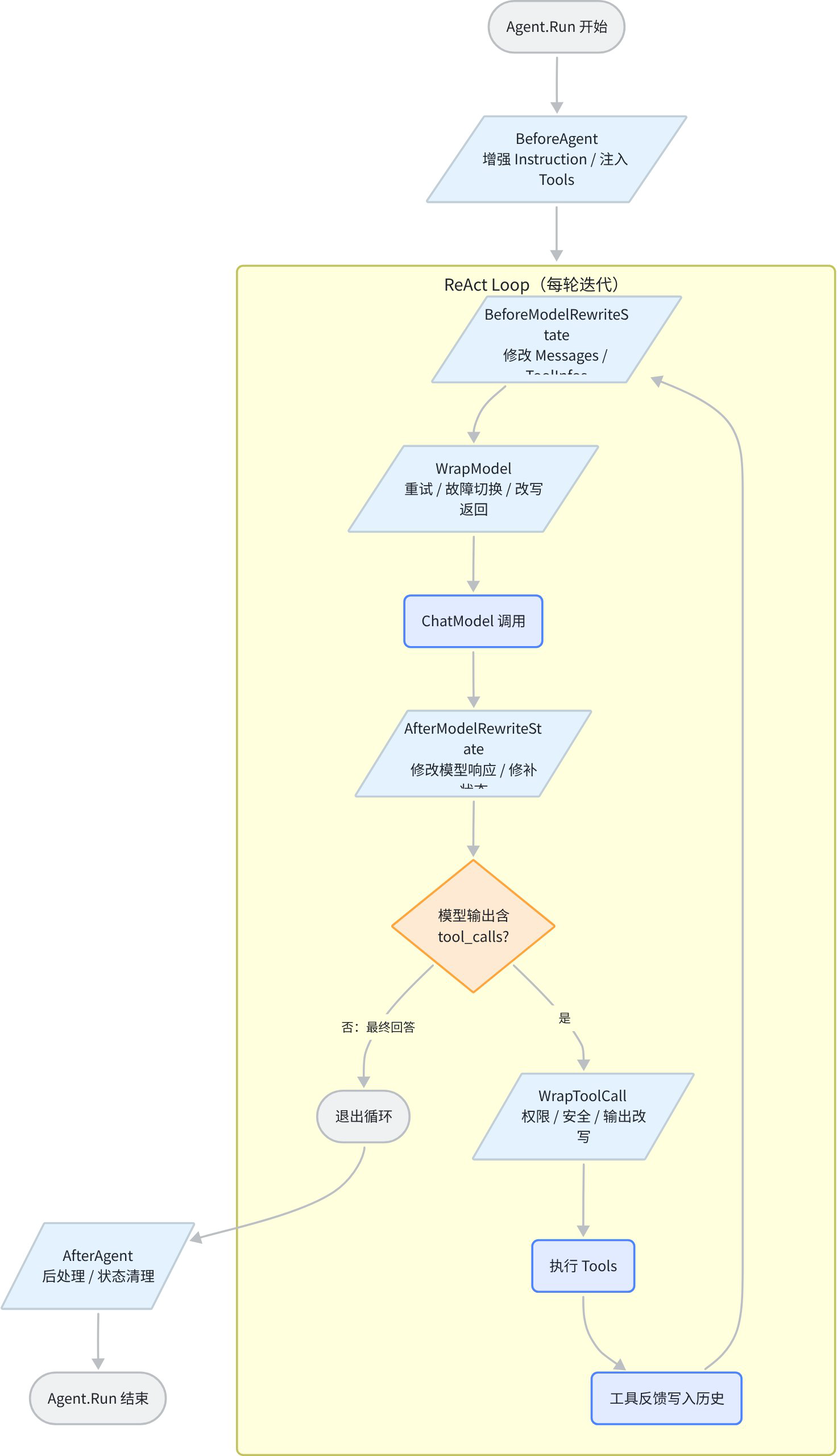
Hook point summary:
| Hook Point | Timing | Typical Use |
BeforeAgent | Before Agent runs (once only) | Enhance Instruction, inject Tools |
BeforeModelRewriteState | Before each model call | Modify Messages / ToolInfos |
AfterModelRewriteState | After each model call | Modify model response or patch state |
WrapModel | Individual model call level | Retry, failover, rewrite model output |
WrapToolCall | Individual tool call level | Permission, safety, output rewriting |
AfterAgent | After Agent completes successfully | Post-processing, state cleanup |
See the appendix at the end for a complete Middleware quick reference.
Quick Start: Creating and Running a ChatModelAgent
Runner is the entry point for executing an Agent. It transforms a user request into an Agent run, handling single-run configuration, event stream output, streaming toggle, and runtime capabilities like checkpoint / resume. The minimal usage is: put a ChatModelAgent into RunnerConfig, then call Query or Run.
The following example shows how to create a minimal ChatModelAgent and execute it through Runner:
package main

import (
    "context"
    "fmt"
    "log"

    "github.com/cloudwego/eino-ext/components/model/ark"
    "github.com/cloudwego/eino/adk"
    "github.com/cloudwego/eino/compose"
    "github.com/cloudwego/eino/components/tool"
)

func main() {
    ctx := context.Background()

    // 1. Create a ChatModel
    chatModel, err := ark.NewChatModel(ctx, &ark.ChatModelConfig{
        Model:  "doubao-seed-1-8-251228",
        APIKey: "your_api_key", // Replace with your API Key
    })
    if err != nil {
        log.Fatal(err)
    }

    // 2. Create a ChatModelAgent
    agent, err := adk.NewChatModelAgent(ctx, &adk.ChatModelAgentConfig{
        Name:        "my-assistant",
        Description: "An assistant that can answer questions using tools.",
        Instruction: "You are a helpful assistant. Please answer user questions based on the available tools.",
        Model:       chatModel,
        ToolsConfig: adk.ToolsConfig{
            ToolsNodeConfig: compose.ToolsNodeConfig{
                Tools: []tool.BaseTool{
                    // Register your tools, e.g., webSearchTool
                },
            },
        },
        // Handlers: []adk.ChatModelAgentMiddleware{...}, // Register Middleware
    })
    if err != nil {
        log.Fatal(err)
    }

    // 3. Execute the Agent via Runner
    runner := adk.NewRunner(ctx, adk.RunnerConfig{
        Agent:           agent,
        EnableStreaming: true,
    })

    // 4. Send a user request and consume the event stream
    iter := runner.Query(ctx, "Help me search for today's news")
    for {
        event, ok := iter.Next()
        if !ok {
            break
        }
        fmt.Println(event)
    }
}
Core flow: NewChatModelAgent → NewRunner → Runner.Query/Run → Consume the AsyncIterator event stream.
For more basic examples, see: Eino: Quick Start.
Further Reading: DeepAgents
DeepAgents is a pre-built ChatModelAgent whose core value lies in two built-in Middleware:
- WriteTodos (PlanTask): Enables the main Agent to explicitly plan a task list before execution and continuously track progress during execution. Complex problems are no longer solved by the model “thinking it all through at once,” but by decomposing first, then progressing step by step.
- TaskTool: Enables the main Agent to delegate subtasks to sub-Agents, which complete them independently and summarize results back to the main loop. This allows a single Agent’s capability boundary to be extended through composition.
Additionally, DeepAgents comes with preset system prompts and an optional FileSystem Middleware, ready to handle scenarios requiring task planning and multi-Agent collaboration out of the box.
DeepAgents = ChatModelAgent
           + WriteTodos (task planning and tracking)
           + TaskTool (subtask delegation)
           + Optional FileSystem
           + Preset system prompts
Further reading:
- Eino ADK Deep Agents Complete Guide: Eino ADK: DeepAgents
- DeepAgents examples: eino-examples/adk/multiagent/deep at main · cloudwego/eino-examples
Further Reading: Why Not Continue Using flow/react?
Returning to first principles: Graph and Agent are two fundamentally different forms of AI applications.
- Graph’s core is determinism: developers pre-define the topology, and the flow relationships between nodes are determined at compile time. Input is structured, and output is predictable.
- Agent’s core is autonomy: the LLM dynamically decides the next action at runtime, execution paths are unpredictable, and output is a full-process event stream.
flow/react is essentially using Graph’s approach to “simulate” an Agent — expanding the ReAct reasoning loop into static nodes and edges. This works, but is fundamentally a mismatch: using deterministic orchestration to carry dynamic decision-making. As Agent complexity grows, this mismatch creates systemic problems:
- Deliverable mismatch: Graph is oriented toward “final results,” while an Agent’s deliverable is the entire process (reasoning traces, intermediate tool calls, state changes). When using Graph for Agents, intermediate processes can only be extracted through side channels like Callbacks — possible, but a patch.
- Execution model mismatch: Graph is a synchronous execution model, while Agents are naturally asynchronous and long-running. Runtime capabilities like event stream output, checkpoint / resume, and interrupt recovery need to be managed uniformly at the Agent level, not scattered across Graph node callbacks.
- Extension point mismatch: Agent runtime enhancements (context compression, dynamic tool loading, model retry, safety controls) are fundamentally about intercepting and injecting into the decision loop. In Graph, these capabilities have no unified mounting point and can only be scattered across various nodes or edges; in ChatModelAgent, they have well-defined lifecycle hooks (Middleware).
Therefore, flow/react isn’t being deprecated — it’s returning to its best-fit position: deterministic workflow orchestration. When the core problem is “autonomous decision-making + runtime enhancement,” the correct abstraction is ChatModelAgent + ChatModelAgentMiddleware.
Further reading:
- Agent or Graph? AI Application Route Analysis: Agent or Graph? AI Application Route Analysis

Appendix: Middleware Quick Reference
Instance Overview
| Middleware | Description |
| Reduction | Truncates overly long tool output / writes to filesystem to prevent token overflow |
| Summarization | Summarizes and compresses historical messages |
| Skill | Exposes reusable instructions/knowledge as Tools, loaded by the Agent on demand |
| FileSystem | ls/read/write/edit/glob/grep/execute file operation toolset |
| ToolSearch | tool_searchmeta-tool that searches and loads tools on demand (reduces the resident tool list footprint) |
| PatchToolCall | Patches dangling tool calls in message history (missing tool results) |
| SafeTool | Intercepts tool execution errors at the WrapToolCall level and converts them to readable text returned to the model, allowing the Agent to self-correct instead of aborting |
| ModelRetry | Retries failed model calls according to configured strategy [built-in config] |
| ModelFailover | Switches to a backup model on model call failure [built-in config] |
| AgentsMD | Injects Agents.md knowledge files into the model context to improve context quality |
| PlanTask | Persistent task management toolset (create/get/update/list) with dependency tracking |
| WriteTodos | Lightweight TODO list tool allowing Agents to create and track structured to-do items [DeepAgent built-in] |
| TaskTool | Sub-Agent delegation tool, the main Agent uses it to dispatch subtasks to sub-Agents for independent execution [DeepAgent built-in] |
| Permission | Tool call permission control [WIP] |
Note: ModelRetry / ModelFailover are built-in fields of
ChatModelAgentConfig(ModelRetryConfig/ModelFailoverConfig) in the code, conceptually corresponding to theWrapModelhook. SafeTool is an example pattern (see ChatWithEino ch05), implemented as a user-defined Middleware. WriteTodos / TaskTool are DeepAgent built-ins and not exported separately. Permission is a planned capability.
Classification
| Category | Problem Solved | Includes |
| Extend Common Tools | Give the Agent more capabilities | FileSystem, Skill, ToolSearch, PlanTask, WriteTodos, TaskTool |
| Handle Errors in ReAct Process | Improve reliability | ModelRetry, ModelFailover, SafeTool, PatchToolCall |
| Keep Context Within Window Limits | Prevent token overflow | Reduction, Summarization, ToolSearch |
| Safety and Permissions | Constrain Agent behavior | Permission |
| Improve Context Content Quality | Give the model better context | Skill, AgentsMD |
ToolSearch spans two categories: it serves as both “Extend Tools” (providing on-demand tool discovery capability) and “Keep Context Within Window Limits” (avoiding loading too many tool descriptions at once).
Further reading:
- ChatModelAgent Middleware Details: Eino ADK: ChatModelAgentMiddleware